VIN Decoder / Vehicle Identification / OEM Parts Lookup

Free VIN Decoder – Vehicle Specs, OEM Parts & Factory Equipment

Decode any VIN in seconds and identify your vehicle configuration, factory equipment, OEM catalog compatibility and original part numbers. Free basic VIN lookup — no registration required.
* Enter 17 characters (letters & digits). Letters I, O, Q are not used.
Data is based on manufacturer (OEM) sources

What you can identify by VIN

  • Vehicle generation, model and trim level
  • Engine type, displacement and transmission
  • Factory-installed equipment and options
  • OEM part numbers from manufacturer catalogs
  • Compatible original and aftermarket replacement parts
  • Exploded OEM diagrams for every vehicle assembly
7zap VIN Decoder identifies vehicle specifications, factory-installed equipment and OEM catalog compatibility using VIN-based vehicle identification technology.

Find OEM Parts by VIN

After VIN identification you can access the full OEM catalog for your vehicle:
  • OEM parts catalogs with original part numbers
  • Exploded diagrams for every assembly and sub-assembly
  • Factory equipment and option codes
  • Compatible replacement parts with fitment data
Browse the OEM parts catalog or decode your VIN to get started.

What is VIN Lookup?

VIN lookup (Vehicle Identification Number lookup) is a free online tool that decodes a 17-character VIN and turns it into readable vehicle information. Since 1981, VINs have a standardized format. The code contains details about the manufacturer, model, model year, engine type, assembly plant, and production sequence.
A VIN decoder helps you verify a vehicle before you buy it, confirm what you own, and make sure you order the correct parts. It is also useful when comparing listings, checking whether a car matches the seller’s description, and reducing the risk of mistakes.

What information does VIN lookup provide?

  • Vehicle make and manufacturer - identify the brand and the company that built the vehicle
  • Model and trim level - determine the exact model and configuration
  • Model year - confirm the model year of the vehicle
  • Country of origin and assembly plant - learn where the vehicle was built
  • Engine specifications - engine type, displacement, and configuration (where available)
  • Body type - sedan, SUV, truck, and other body styles
  • Safety and equipment signals - some standard equipment and safety attributes (where available)
  • Technical identifiers - additional identifiers that can help with parts matching

How to use VIN lookup

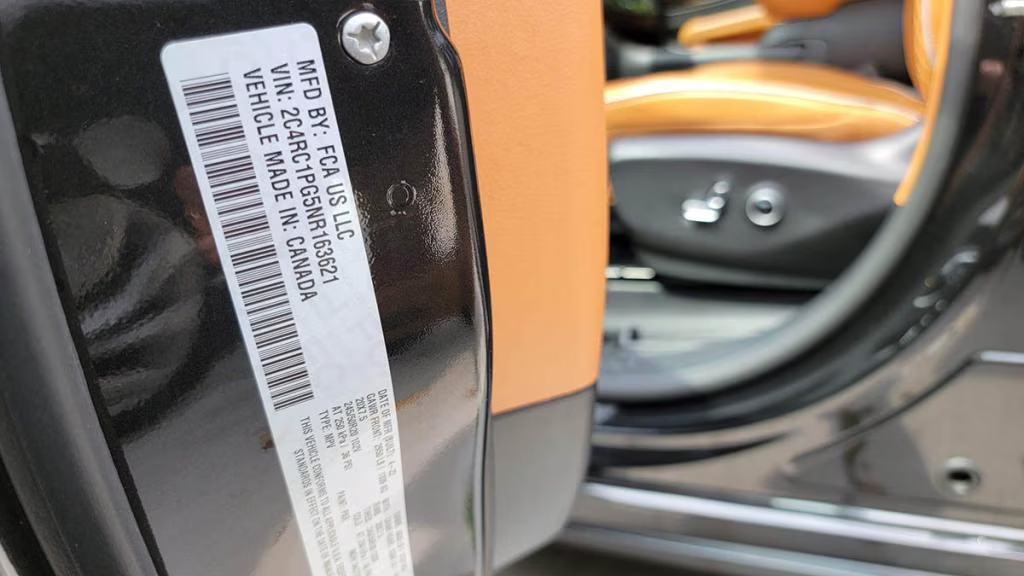
  1. Find the 17-character VIN (windshield, driver door jamb, or documents).
  2. Enter it into the VIN lookup field.
  3. Review decoded results and compare them with the listing or your documents.
  4. If you need OEM-level details and parts diagrams, use Premium features.
Premium VIN lookup can unlock deeper OEM technical specifications, factory options, trim packages, and access to official parts catalogs with diagrams.
Note: VIN decoding does not reveal personal owner information. Owner data is private and stored in official registries.


What Free VIN Decoder gives

  • Make
  • Model
  • Model year
* Free version does not show technical specs, trims, diagrams or parts.

What Premium / Subscription gives

  • Technical specs: power, displacement, weight, dimensions
  • Full trims, options and configurations
  • Access to OEM catalogs, diagrams and drawings
  • Subscription covers multiple VINs — not just one car
VIN decoder as a gateway
VIN lookup leads to deep parts work: catalogs, assemblies, OEM numbers.
OEM data
More reliable than public sources. Coverage depends on brand and region.
For multiple VINs
Subscription designed for repeated VIN checks — not a single-car report.
AI mechanic repair tips
Personalized guidance for diagnostics, components and work order.
Preview of VIN search information
Example result. Fictional data.
XXXXXXXXXXXXXXXXX
Electric Vehicle
Example result. Fictional data.
Brand
Model
Year
Production date
Vehicle Details
Body
Steering
Body color
Roof color
Trim color
Drive & Transmission
EngineElectric
Power— kW
Torque— Nm
Transmission
Drive
Battery & Charging
Battery— kWh
Charger
Cable
Vehicle inlet
Transmission
Regional Data
Country
Manual
Type approval
Country group
Sales program
Suspension & Brakes
Rear stabilizer bar
Shock absorption
Rear brakes
Front brakes
Steering system
Safety Systems
Airbags
Side airbags
Forward collision
Lane keeping
Tire pressure monitoring
Comfort & Interior
Seats
Seat heating
Lumbar support
Steering wheel
Climate control
Wheels & Tires
Wheels front
Wheels rear
Tires front
Tires rear
Wheel bolts
Electronics
Navigation
Display
Head-up display
Mobile interface
Digital radio
Lighting & Vision
Headlamps
Rear lights
Daytime running
Mirrors
Windshield
Preview of catalog UI
Preview of AI mechanic

VIN structure: WMI / VDS / VIS

VIN has 17 characters: WMI (1–3), VDS (4–9), VIS (10–17). Letters I, O, Q are not used. Position 9 is the check digit.
VIN map
Positions 1–17 with WMI/VDS/VIS highlighted
VIN segments and key positions (year, plant, serial).
WMI (1–3)
VDS (4–9)
VIS (10–17)
Check digit (9)
1HGCM82633A123456
1HG=Honda (US) • 9=check digit • 10=3=2003 • 11=A=plant
WDB1234561A654321
WDB=Mercedes‑Benz (DE) • 9=check digit • 10=1=2001 • 11=A=plant
JTDKB20U793049856
JTD=Toyota (JP) • 9=check digit • 10=9=2009 • 11=3=plant
Tip: verify the 9th check digit (0–9 or X) with the official NHTSA calculator; model year is coded in the 10th position by standard tables.

Where to find your VIN

Dashboard (visible through windshield)
Driver door jamb label
Registration / title documents
Support

FAQ — frequently asked questions

Quick answers about VIN lookup, vehicle identification, OEM parts and catalog access.