VIN Decoder

Genesis VIN Decoder - Free VIN Lookup

Free • 3 sec • No signup
Enter your 17-character Genesis VIN to decode the exact model, trim, engine, transmission, and production details—then use the results to confirm specs and find compatible OEM parts.
✓ Exact Genesis model, trim & drivetrain
✓ Factory engine/transmission identification
✓ Faster, safer parts compatibility checks
No registration required. Results in ~3 seconds.
Every Genesis has a unique 17-character VIN. A genesis vin decoder turns that code into practical details for ownership, repairs, and parts ordering. Use a genesis vin lookup to verify the vehicle configuration, and a genesis vin check to confirm key identifiers before you buy parts or schedule service.
Overview

Decode Your Genesis VIN in Seconds

A Vehicle Identification Number (VIN) is standardized under ISO 3779/3780 and U.S. regulations (49 CFR Part 565). With a genesis vin decoder, you can decode genesis vin data by splitting the VIN into WMI (manufacturer), VDS (vehicle descriptor), and VIS (vehicle identifier). This helps you confirm what your Genesis really is—especially when trims, engines, or mid-year changes make visual identification unreliable.

Run a genesis vin lookup here, then compare results with the door-jamb label and registration. A genesis vin number check can validate the check digit (position 9) and confirm model year (position 10). For deeper detail—like a genesis vin decoder build sheet view of equipment—decoded specs are the safest way to match parts and service procedures. Start with our free VIN decoder and keep your genesis vehicle identification number accurate across quotes, repairs, and resale. To decode other vehicle brands with the same precision, use our VIN decoder.

Help

Where is the VIN number on a Genesis?

Common Genesis VIN locations include:
Dashboard (driver’s side, visible through the windshield)
Driver’s door jamb/door pillar label (VIN + tire and loading info)
Vehicle registration and title documents
Insurance card or policy documents
Under the hood (engine bay label/sticker, where equipped)
Front strut tower area or radiator support (label plate on some models)
Owner’s manual packet (VIN label/card, if kept by previous owner)
Infotainment/vehicle settings screen (digital VIN display on some newer Genesis models)
OEM window sticker or dealer paperwork (for newer vehicles)
i
For a clean lookup, enter the VIN exactly as shown (17 characters, no spaces). Letters I, O, and Q are never used in VINs, which helps avoid mix-ups with 1 and 0.
Capabilities

Genesis VIN lookup: what you can learn

A good VIN lookup can help confirm:
Basic vehicle identity
• Model line (e.g., G70, G80, G90, GV70, GV80, GV60) • Body type and restraint/series information (varies by VIN) • Model year code and sequence number • Market/region indicators (depends on manufacturer encoding)
Factory specifications
• Engine family/size (as encoded by the manufacturer) • Transmission type (automatic/manual where applicable) • Drivetrain (RWD/AWD, when supported by VIN data) • Production/assembly details such as plant code (position 11)
Service & parts confidence
• Fitment guidance when trims share similar names • Cross-check for recalls/service campaigns using the correct VIN • Support for ordering parts based on decoded configuration • Reduced wrong-part returns due to mid-year or package changes
A Genesis VIN lookup is most useful when you’re verifying a used car listing, matching parts, or confirming service procedures. Because the VIN encodes manufacturer and configuration details, it helps you avoid relying on visual cues that can be misleading after repairs, swaps, or trim-level changes.
VIN anatomy

How the Genesis VIN number is structured

Every modern Genesis VIN uses a 17-character format split into three blocks that identify the maker, vehicle attributes, and the unique production sequence.
WMI (positions 1-3)
The WMI identifies the manufacturer and region. On Genesis vehicles, the WMI may appear as Genesis Motor Co. or Hyundai Motor Company depending on the market and model year (for example, earlier “Hyundai Genesis” models and some production allocations). This block helps confirm who built the vehicle and where it is registered as manufactured.
VDS (positions 4-9)
The VDS describes the vehicle’s attributes as defined by the manufacturer—often covering model line, body/series, engine family, and restraint system. Position 9 is the check digit on U.S.-standard VINs; it’s calculated from the other characters to help detect typos. This is why a VIN is more reliable than trim badges alone.
VIS (positions 10-17)
The VIS includes the model year (position 10), assembly plant code (position 11), and the sequential production number (positions 12-17). The year code follows an industry cycle (e.g., H=2017, M=2021, R=2024). The plant code is manufacturer-specific and can indicate which facility assembled the vehicle.
Manufacturing

Major production plants

Genesis vehicles are primarily produced within Hyundai Motor Group’s manufacturing network. Depending on your VIN and model year, assembly may be in South Korea or North America, with additional powertrain and EV manufacturing support from specialized facilities.
Hyundai Motor Company Ulsan Plant 1
Ulsan, South Korea (1968–present)
Hyundai Motor Company Ulsan Plant 2
Ulsan, South Korea (1979–present)
Hyundai Motor Company Ulsan Plant 3
Ulsan, South Korea (1983–present)
Hyundai Motor Company Ulsan Plant 4
Ulsan, South Korea (1990–present)
Hyundai Motor Company Ulsan Plant 5
Ulsan, South Korea (1996–present)
Hyundai Motor Company Asan Plant
Asan, Chungcheongnam-do, South Korea (1996–present)
Hyundai Motor Manufacturing Alabama (HMMA)
Montgomery, Alabama, USA (2005–present)
Hyundai Motor Group Metaplant America (HMGMA)
Ellabell (Bryan County), Georgia, USA (2024–present)
Hyundai Motor Company Ulsan Engine Plant (Ulsan Complex)
Ulsan, South Korea (powertrain production, long-running facility within Ulsan complex)
Hyundai Transys Seosan Plant
Seosan, South Korea (transmission manufacturing, 2000s–present)
Hyundai WIA Ulsan Plant
Ulsan, South Korea (powertrain/components manufacturing, 1970s–present)
Hyundai Motor Group Innovation Center Singapore (HMGICS)
Singapore (2023–present)
i
On most VINs, the assembly plant is encoded at position 11. Plant-code meanings are manufacturer-specific, so decoding the full VIN is the fastest way to connect a plant code to an actual facility for your exact Genesis configuration.
Value

Benefits of Using a Genesis VIN Decoder

Useful, verification-first details that help owners and professionals avoid mistakes and make better decisions.
Accurate parts matching
Genesis trims can share body panels while using different engines, drivetrains, or brake packages. Decoding the VIN helps confirm the underlying configuration so you can choose parts that actually fit your vehicle, reducing returns and downtime.
Smarter service planning
A decoded VIN supports correct maintenance procedures by identifying the vehicle’s model year and key spec family. It’s especially helpful when service intervals or fluid specifications vary across engines, AWD vs RWD, and mid-year updates.
Confident used-car verification
A Genesis VIN check helps you validate what a seller claims—model, year, and core configuration—before you commit. It also helps spot simple listing errors (wrong trim/year) that can affect insurance quotes, resale value, and repair costs.
Clean documentation and records
Using the VIN as the single source of truth keeps invoices, shop RO notes, and ownership paperwork consistent. That consistency matters for warranty discussions, recall checks, resale listings, and avoiding mismatched records across different databases.
Social proof

Trusted by Genesis Owners & Professionals

Real feedback from owners, technicians, and parts teams using VIN decoding for accurate specs and fitment.
Ethan
5
5.0
Service TechnicianDallas
We see G70 and GV80 trims that look identical, but the VIN decode confirms engine family, driveline, and build specifics quickly. It cuts the back-and-forth with parts ordering and helps us quote accurately the first time.
Sofia
5
5.0
Auto Parts ManagerChicago
The Genesis VIN lookup is especially helpful for brake and suspension variations between model years. I use the decoded transmission and production info to avoid returns, and customers appreciate that we verify fitment before they pay.
Minho
5
5.0
Independent MechanicLos Angeles
On a G80, small spec differences can change the correct sensor or module. A Genesis VIN check gives me confidence that the vehicle data matches what’s in the bay, saving diagnostic time and preventing wrong-part installations.
Claire
5
5.0
Garage OwnerToronto
We use the decoder when customers bring imported or out-of-state Genesis vehicles. It’s a clean way to confirm model year and configuration before service, and it keeps our invoices and maintenance records consistent.
Javier
5
5.0
Car EnthusiastMiami
I ran a Genesis VIN number check before buying a used GV70 and it helped confirm the trim and drivetrain matched the listing. The decoded details made it easier to compare options and avoid surprises after purchase.
Why premium

Genesis VIN Decoder vs Free Tools

Basic tools often return only the model year and generic make/model, while a deeper Genesis VIN decoder is designed to surface practical build data for real-world parts and service decisions.

How to use the decoder to find parts

Enter your 17-character Genesis VIN (no spaces) into the search field
Review decoded results like model, year, engine, transmission, and plant/production details
Confirm the VIN matches the door-jamb label and your registration
Open the OEM parts catalog from the decoded vehicle profile
Choose a parts group or search by keyword, then match by your decoded configuration

Free vs Premium Genesis VIN Decoder

Compare plan features to choose the level of detail you need for ownership, service, or parts work.
Free
View diagrams per day
View 1 diagrams per day
VIN identifications per month for month(s)
10 VIN identifications per month for 1 month(s)
Ad-free
Full part numbers in catalogs
Applicability Of Spare Parts
Maintenance Parts
Free
View diagrams per day
View 1 diagrams per day
VIN identifications per month for month(s)
10 VIN identifications per month for 1 month(s)
Ad-free
Full part numbers in catalogs
Applicability Of Spare Parts
Maintenance Parts
Reference

Genesis WMI codes (real identifiers)

WMIs are the first three characters of the VIN. They identify the manufacturer and region. On Genesis vehicles, you may see Genesis Motor Co. WMIs on newer vehicles and Hyundai Motor Company WMIs on earlier Genesis model-line vehicles or certain market allocations.
Examples

Realistic Genesis VIN examples

These examples show how a Genesis VIN decoder reads manufacturer, year code, and plant/sequence information. VINs below are formatted correctly for demonstration and may not correspond to an actual registered vehicle.
KMHGC4DD1CU123456
Genesis Sedan, V6 (varies by trim), RWD, automatic
WMIKMH = Hyundai Motor Company, South Korea (Genesis model line era)
Check digitPosition 9: 1 (check digit character)
Model year (position 10)C = 2012
Plant code (position 11)Position 11: U (plant code shown in example; plant mapping is manufacturer-specific)
Genesis was a Hyundai model line at this time; many VINs will show Hyundai WMIs rather than Genesis Motor Co.

Genesis VIN preview

Example of decoded Genesis VIN details and how key specs are presented for quick verification and parts catalog navigation.
Genesis VIN preview
Decoded preview
VIN
5N3HLDCH4RA012345
Brand
Genesis
Model
GV70
Year
2024
Production date
2024-03 (example)
Engine
Turbo gasoline (varies by trim; example)
Transmission
Automatic (example)
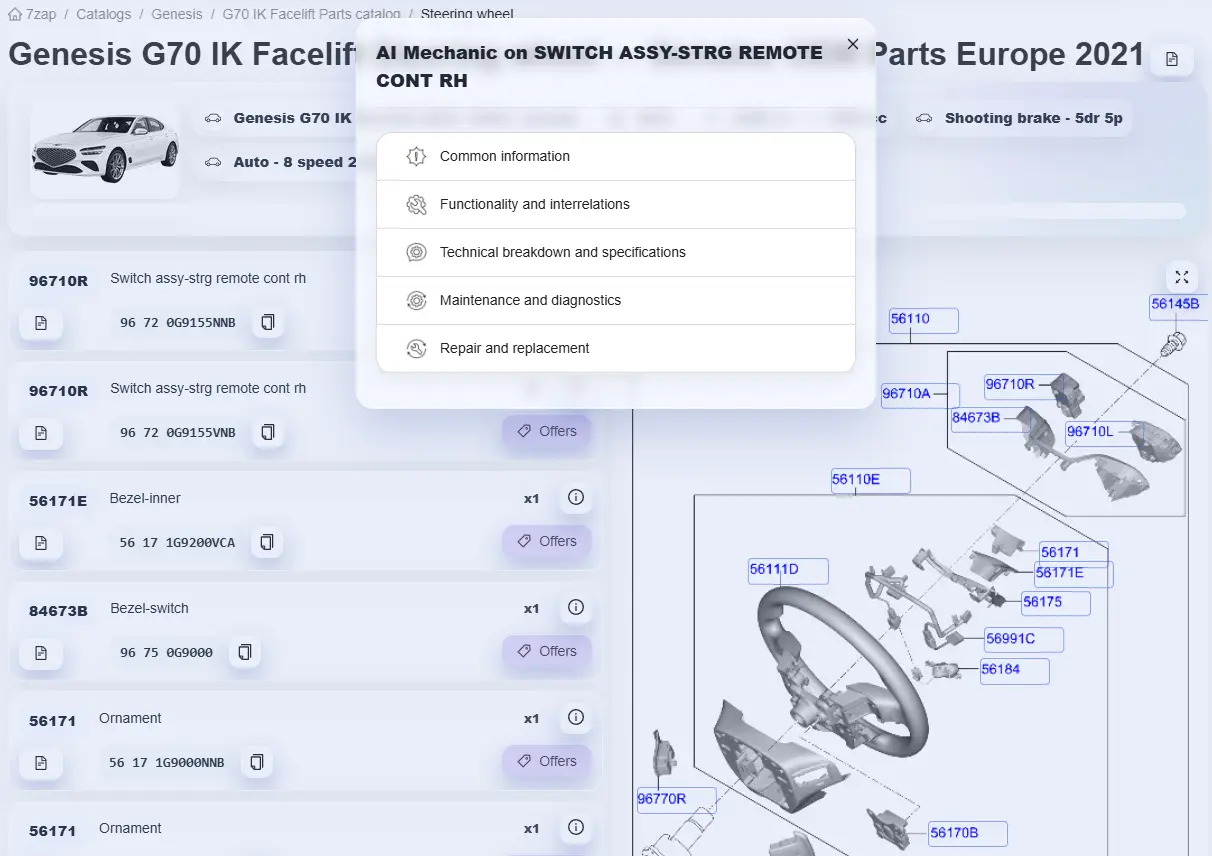
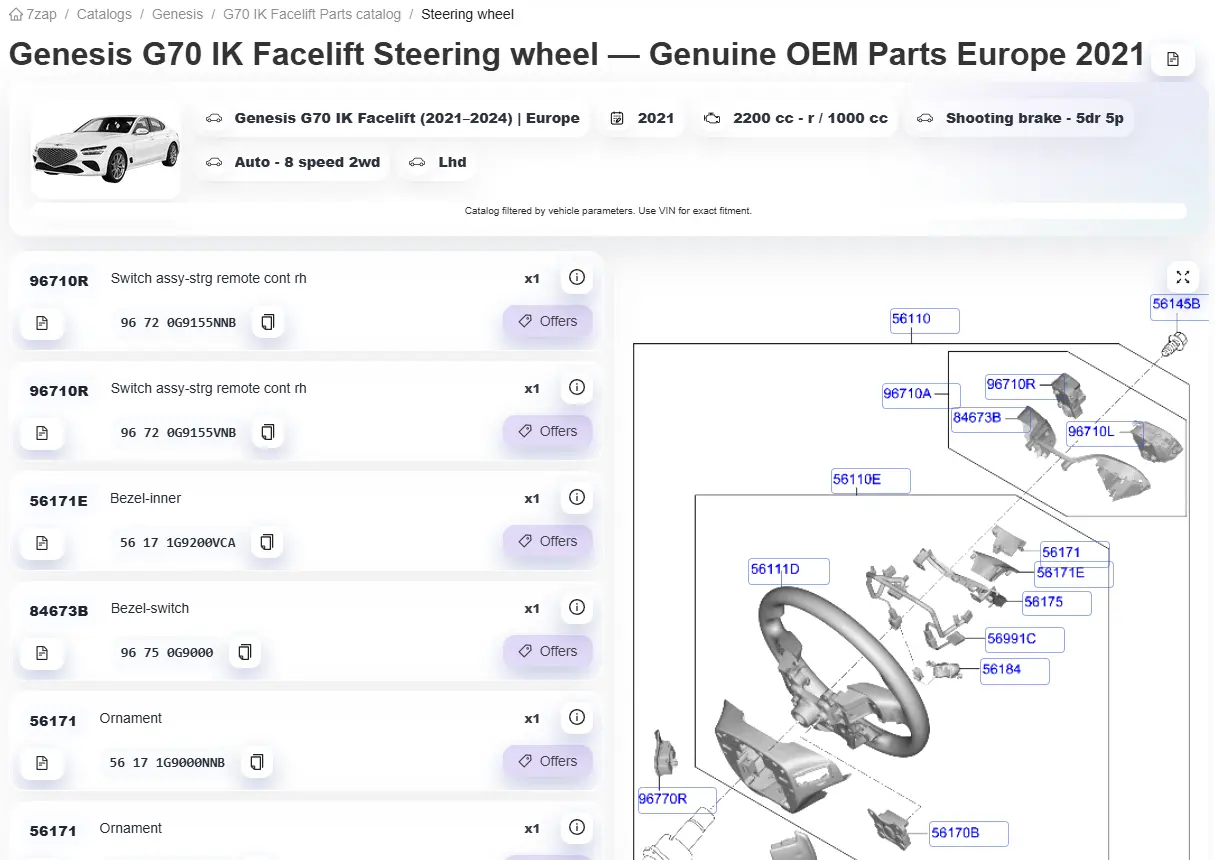
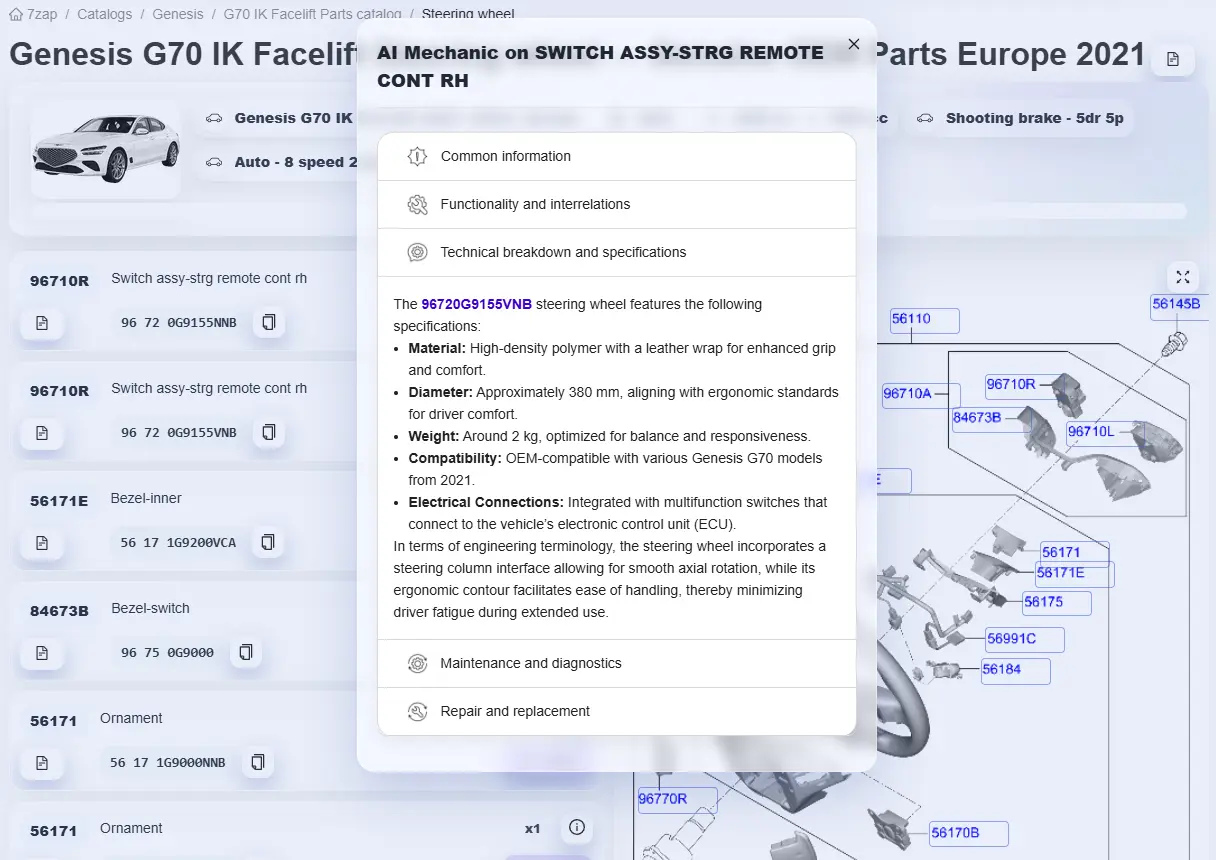
Genesis catalog preview
Screenshot
Screenshot
Screenshot
Support

FAQ

Quick answers to common questions about Genesis VIN decoding and VIN-based verification.

VIN decoders for other brands

Decode VINs for other manufacturers with the same level of accuracy and OEM-based data.