

You've got a reliable Honda Civic (2016–2021)—now make it work for you. This guide shows which accessories add real daily value without cluttering the cabin: dash cam wiring that doesn't sag, phone mount positioning that leaves HVAC controls free, a cargo setup that stops grocery bags from sliding, and a simple power kit for road trips.
The owner's profile (real scenario)
Meet Sarah: 45‑minute daily commute, occasional 500‑mile weekend drives, and grocery runs twice a week. Her Civic LX has basic tech but no built‑in nav screen. She wants a clean install—nothing taped onto vents or blocking airbags.
Dash cam: hardwire or power socket?
A good front/rear dash cam protects your insurance claim and parking lot peace of mind. For the Civic:
- Hardwire kit taps the fuse box (interior on the left lower panel); use ACC or IGN circuits so the cam shuts off with the key.
- Route the cable behind the A‑pillar trim (pop it gently with a plastic tool) and along the headliner to the windshield.
- Rear cam cable goes through the rubber boot at the tailgate hinge; fishing it takes patience but keeps it clean.
Tip: pair with a low‑profile 128–256 GB endurance SD card; cheap cards fail fast in heat.
Phone mount: the only spot that works
On the Civic (2016–2021), the best mounting zone is the dashboard vent clip aimed at the top left or center vent—still leaves climate controls accessible. Avoid suction mounts on the windshield in hot climates; they fall off in July.
- Pick a mount with a quick‑release ball joint and cable‑routing groove.
- Run the USB cable along the dash seam toward the center console—no loose loops.
Cargo organizer that actually stays put
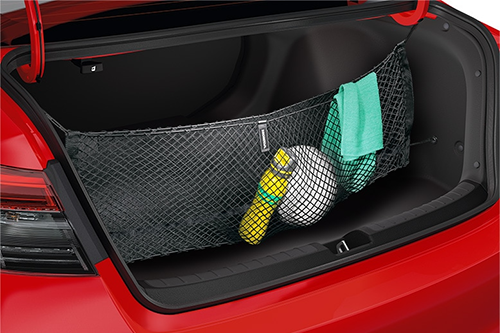
The Civic trunk is wide but shallow. A collapsible trunk organizer with velcro pads works better than bungees. Place it forward, near the seatback—bags stay upright through corners.
- Keep a small soft cooler in one section for frozen goods in summer.
- Add a micro toolkit and a first‑aid kit in another section—always there when you need it.
Road‑trip power upgrade
The Civic has one 12 V socket in the center console. For longer trips, Sarah added:
- Dual USB‑C PD charger (65 W) in the main socket—charges her laptop and phone simultaneously.
- Compact 300 W pure‑sine inverter wired to the battery via a fused pigtail (she keeps it unplugged when parked to avoid parasitic draw).
- Bluetooth OBD‑II dongle with auto‑sleep—monitors coolant temp and voltage on long drives; pulls codes if a light pops.
Install tips for the platform
- Dash cam fuse tap: use a low‑profile add‑a‑circuit; ACC or ROOM circuit is perfect. Confirm the cam parks when the key is out.
- Inverter mounting: velcro it to the carpet behind the driver's seat where airflow is decent and it won't shift.
- Cable runs: tuck wires behind trim edges; no tape on visible surfaces.
Costs and reality check
- Dash cam (front/rear): ~$120–200 for a reputable brand with hardwire kit.
- Phone mount: ~$15–30 for a solid vent clip design.
- Cargo organizer: ~$25–50; collapsible, washable nylon.
- Power kit (PD charger + inverter + OBD): ~$100–180 total.
One‑time investment, daily payoff.
Common mistakes to skip
- Suction‑mount everything—falls off in heat or on rough roads.
- Leaving the OBD dongle plugged in without confirming auto‑sleep; dead battery in the morning.
- Piling inverters and splitters on a single socket—overheated wiring and blown fuses.
One‑month follow‑up checklist
- Dash cam footage clear? SD card still recording? Check once a month.
- Phone mount still tight? Retighten the vent clip if it sags.
- Inverter cables warm or hot after use? Upgrade fuse size or wire gauge if needed.
For parts and wiring diagrams
Consult the 7zap catalog for VIN‑matched connectors, fuse box layouts, and trim panel part numbers: honda.7zap.com.
Bottom line
Sarah's Civic now has a hardwired dash cam with parking mode, a phone mount that doesn't block vents, a trunk that stays organized through sharp turns, and enough clean power for weekend trips—all without sticky pads or dangling cables. Your setup can be just as clean if you plan access points and cable runs first.